

⏱️ Session Timeout & Manual Chat Expiry
Flowbee allows you to control how long a chatbot session or manual chat remains active. This ensures conversations are properly managed and automatically reset when users become inactive.
What is Session Timeout?
Session Timeout defines how long a chatbot conversation stays active when the user is inactive.
👉 If the user does not respond within the defined time:
- The session expires
- Chatbot resets
- Next message starts from the beginning
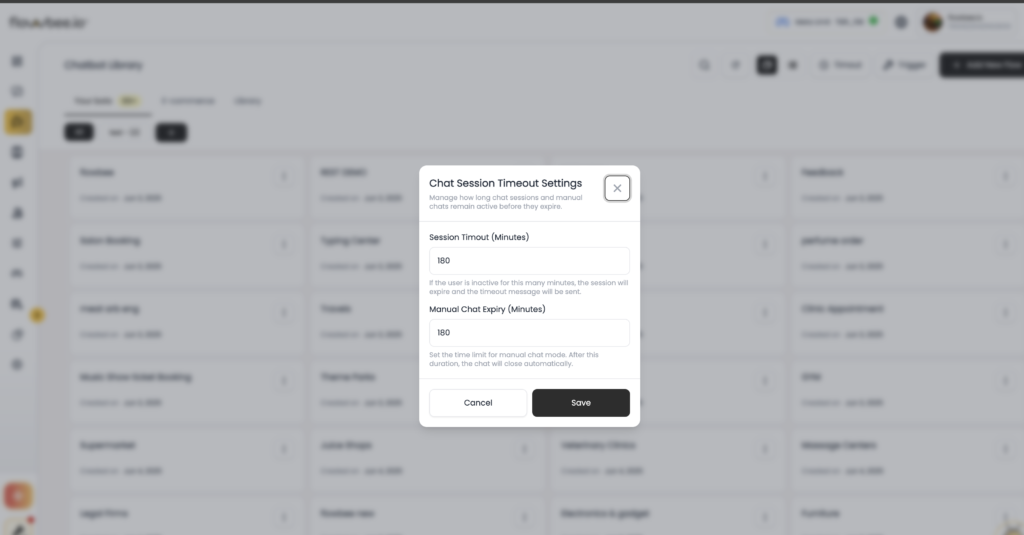
⏱️ Session Timeout (Minutes)
Set the inactivity time for chatbot session.
Example:
- Set to 180 minutes
→ If user does not reply for 3 hours
→ Chatbot restarts from beginning
💡 Behavior
- User inactive → Session expires
- User sends message later → Chatbot starts fresh
- Welcome / Default flow will trigger again
What is Manual Chat Expiry?
Manual Chat Expiry controls how long a conversation stays in manual mode (agent handling).
👉 After expiry:
- Chat automatically closes
- Chatbot resumes control
👤 Manual Chat Expiry (Minutes)
Set how long manual chat remains active.
Example:
- Set to 180 minutes
→ After 3 hours of inactivity
→ Manual chat ends
→ Chatbot takes over again
How It Works
Chatbot Session Flow
- User interacts with chatbot
- No response for defined time
- Session expires
- Next message → chatbot restarts
Manual Chat Flow
- Bot switched to manual chat
- Agent handles conversation
- No activity for defined time
- Manual chat closes
- Chatbot becomes active again
Why It Matters
- Prevents stuck conversations
- Automatically resets chatbot flow
- Ensures smooth user experience
- Reduces dependency on agents
Tips
- Keep session timeout reasonable (e.g., 30–180 mins)
- Use shorter timeout for fast-response businesses
- Always configure manual expiry to avoid dead chats
- Test behavior before going live
Common Scenarios
User comes after long gap
→ Chatbot starts from beginning
Agent forgot to close chat
→ Manual chat auto-expires
Summary
Session Timeout and Manual Chat Expiry help you manage conversation flow efficiently. They ensure inactive chats are reset and control is properly handed between chatbot and human agents.