

Chatbot
Flowbee Chatbot helps you automate customer conversations on WhatsApp, allowing your business to respond instantly, capture leads, and guide users without manual effort.
With chatbots, you can handle inquiries, provide information, and manage customer interactions 24/7.
What is Chatbot?
Chatbot is an automated messaging system that responds to customer messages based on predefined flows, buttons, and logic.
It allows you to create structured conversations that guide customers through different options such as services, products, or support.
Why It Matters
- Respond to customers instantly (24/7)
- Reduce manual workload
- Capture leads automatically
- Improve customer experience
- Never miss a conversation
Key Features
- 🤖 No-code chatbot builder
- 🔘 Button-based interactions
- 📋 List message support
- 🔁 Flow-based automation
- 🌍 Multi-language support
- 📊 Lead capture and tracking
Things to Know Before Building Your First Chatbot
Before you start building your first chatbot with Flowbee.io, here are a few important things to understand. This guide will help you get familiar with how chatbots work and how you can use them to automate your business conversations effectively.
What is a Chatbot in Flowbee?
Imagine having a smart assistant available 24/7 on your WhatsApp – ready to respond to customers, guide them, and handle their requests without delay. That’s exactly what a Flowbee chatbot does.
But it’s not just about sending automated replies. Flowbee chatbots are designed to create structured, interactive experiences where customers can choose options, explore services, and complete actions step by step – just like a kiosk system.
How Chatbots Work in Flowbee
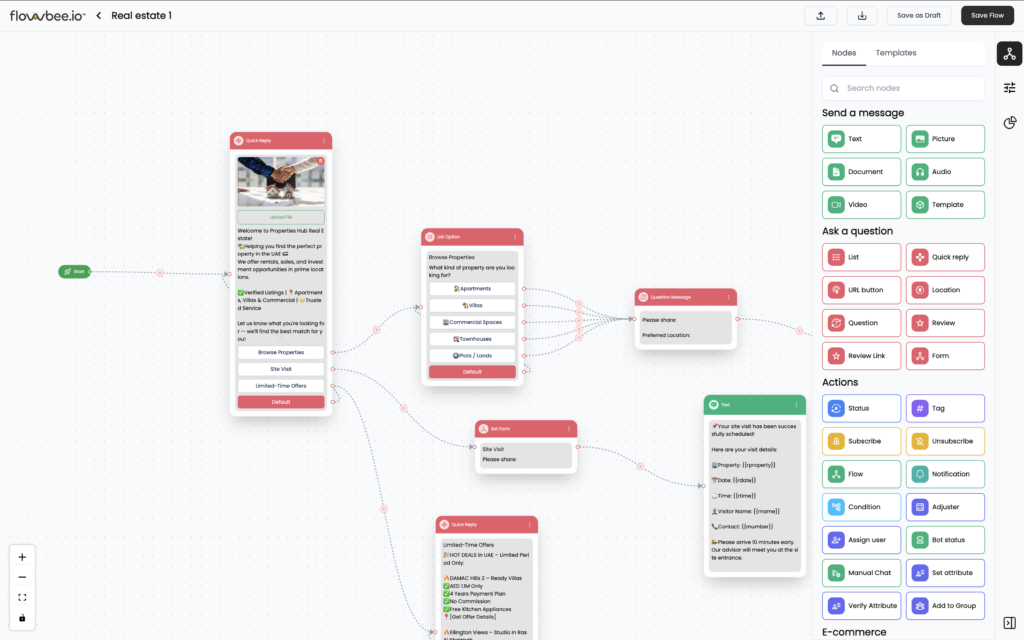
A chatbot in Flowbee is built using flows. Each flow is like a guided path that tells the chatbot how to respond in different situations.
For example:
You can create a chatbot called “Business Assistant Bot”
Inside this chatbot, you can create multiple flows such as:
- Service Booking
- Order Confirmation
- Lead Qualification
- Customer Enquiry
Each flow contains steps where the chatbot:
- Shows buttons or lists
- Asks questions
- Collects user input
- Moves the conversation forward
How Chatbots Get Triggered
In Flowbee, chatbot flows can be triggered in multiple ways.
Keyword-Based Trigger
You can assign keywords to start specific flows.
For example:
- “Hi” → Opens main menu
- “Book” → Starts booking flow
- “Order” → Shows order options
When a customer sends a matching message, the chatbot automatically starts the related flow.
Default Chatbot Flow
You can also set a default chatbot that starts whenever a customer sends a message.
This ensures:
- Instant response
- No missed conversations
- Smooth customer experience
What You Can Do with Flowbee Chatbots
Flowbee chatbots are flexible and can be customized based on your business needs.
You can use them for:
- Lead qualification
- Service booking
- Order confirmation
- Customer enquiries
- Support handling
And the best part?
👉 Your chatbot works 24/7, based on your configured logic.
Powerful Features Inside Chatbot
Flowbee chatbot is not just basic automation — it comes with powerful tools to build advanced workflows:
- Button and list-based interactions
- Conditional logic for smart responses
- Payment nodes for collecting payments
- Google Sheets integration for storing data
- API integration for connecting external systems
Before You Start
Before building your chatbot:
- Plan your conversation flow
- Keep options simple and clear
- Decide what you want to automate
- Test your chatbot before going live